


Forms play a crucial role in gathering user data, tracking inquiries, and converting visitors into leads on WordPress-powered websites. But what happens when you need to know exactly when a form was submitted? Tracking form submission timestamps is vital for business owners and developers aiming to improve response time, streamline operations, or simply keep better records.
This blog explores the challenges users face when trying to track form submission times in WordPress. We’ll walk through the common issues, what users typically investigate, and, most importantly, how to implement solutions that make form tracking easier and more effective. By the end, you’ll learn the best tools and practices for making form submission tracking a breeze.
What Are Forms in WordPress?
Forms in WordPress are interactive elements that allow users to submit data on a website. They are essential for collecting information, such as contact details, feedback, registrations, and orders. Forms can be created using built-in features, plugins, or custom code.

Types of Forms in WordPress
WordPress forms can serve different purposes, including:
- Contact Forms – Allow users to reach out to website owners.
- Registration Forms – Enable user sign-ups for memberships or events.
- Login Forms – Provide user authentication for restricted content.
- Subscription Forms – Collect emails for newsletters and marketing campaigns.
- Order & Payment Forms – Process e-commerce transactions.
- Survey & Feedback Forms – Gather user opinions and testimonials.
- Support & Inquiry Forms – Help with customer service requests.
The Issue: Trouble Tracking Form Submissions
Imagine this scenario—you own a business website, and a potential customer reaches out through your contact form. You only notice their inquiry hours later, and your delayed response leads to them choosing a competitor instead. Frustrating, right?
The core issue here is not knowing when the form submission occurred, leaving website administrators without crucial timing information to prioritize and respond effectively. Unfortunately, this problem can lead to missed opportunities, especially for time-sensitive inquiries such as support tickets or sales leads.
User’s Acknowledgment of the Problem
Many WordPress users find themselves asking similar questions:
- “How can I determine the precise time of submission if I can see the submitted content in the form?”
- “Is there a way to configure my WordPress forms to include a timestamp?”
If you’ve faced this issue, know you’re not alone. It’s a common challenge, but the good news is that solutions exist with a bit of tweaking and the right tools.
The User’s Investigation
Naturally, users turn to investigation to solve this issue. A search might lead you to forums, plugins, or guides, but often, the information that comes up isn’t straightforward.
You might find:
- Forms saving submissions without timestamps.
- Email notifications from the forms but with inconsistent or missing timestamps.
- Plugins that promise solutions but require upgrades or advanced configuration.
At this point, frustration kicks in. Without a reliable form submission tracking system, essential data is slipping through the cracks.
User’s Inquiry
By now, website owners and developers start hunting for solutions, asking the following questions:
- “Is it possible to see the submission time of forms in the WordPress dashboard?”
- “Is there a particular plugin I need, and how straightforward is the configuration process?”
- “Is there a reliable solution for my existing forms without rebuilding them from scratch?”
Thankfully, there are straightforward answers to these questions. Let’s discuss some practical methods to monitor form submissions effectively.
How to Track Form Submissions in WordPress
If you’ve been frustrated trying to manage form timestamps, here’s what you can do. Depending on the plugins you use, WordPress offers several tools and features to ensure you’re notified when a form is filled out—and know exactly when it happened.
1. Enable Email Notifications with Time Stamps
Most form-builder plugins for WordPress, such as WPForms, Ninja Forms, or Contact Form 7, allow you to configure email notifications. These notifications typically include the date and time of the submission. Ensure you:
- Navigate to the plugin’s notification settings.
- Include {date} or {time} tags in your notification email template (tags may vary depending on the plugin you use).
- Test the notifications to confirm timestamps appear.
2. Leverage Form Submission Logs
Many plugins also log submissions directly in WordPress. WPForms, for example, keeps a record of all entries in the “Entries” section of the plugin dashboard. These logs usually include:
- Form submission content.
- The exact date and time of submission.
- Additional analytics like the user’s IP address.
Accessing these logs allows you to retrieve timestamps for any past form submission.
3. Install Plugins with Built-in Tracking
Several third-party WordPress plugins provide robust form tracking features:
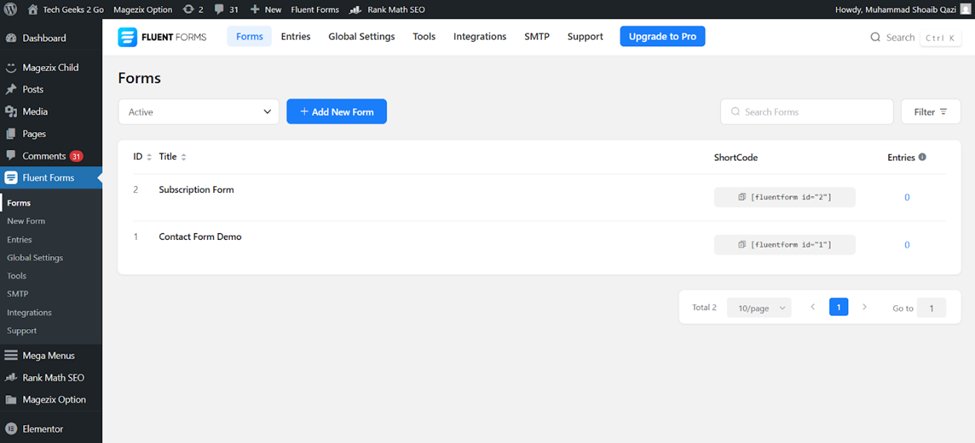
- Fluent Forms: Offers a built-in submission tracking dashboard for free users.
- Gravity Forms + Add-ons: Provides advanced logging functionalities for every submission, including timestamps, user IDs, and more.
- Formidable Forms (recommended): This powerful form-building plugin allows you to record, analyze, and track form submission data right from your admin dashboard.
Track Everything with Formidable’s User Flow (Premium Option)
If you’re looking for the ultimate form tracking solution, consider Formidable Forms’ premium plugin and its User Flow feature. This comprehensive tool goes beyond simple timestamps – it’s designed for businesses committed to making data-driven decisions.
Why Choose Formidable Forms User Flow?
- Detailed Tracking
Track form submissions alongside user behavior before and after they leave the form, offering deeper insights.
- Real-Time Notifications
Get notified instantly via email or SMS about new submissions with precise timestamps included.
- Integrations
Connect with CRMs or email marketing software to keep all data synced automatically.
Setting up Formidable Forms only takes a few minutes, and the benefits of having these granular insights vastly outweigh any initial setup investment.
Community Response and Best Practices
The WordPress community has been proactive in addressing this challenge, and forums often highlight small tweaks to enhance form tracking abilities:
- Use hooks or custom code snippets to append timestamps to fields directly in plugins like Contact Form 7.
- Regularly back up form submissions to prevent accidental data loss for highly-used forms.
- Test all email notifications and form logs after installation or updates to ensure timestamps remain consistent.
These best practices ensure your forms operate smoothly without losing critical submission time data.
Take Control of Your WordPress Forms Today
Now that you know how to track form submissions in WordPress, it’s time to take action. By enabling email notifications, using form logs, or integrating advanced form-building plugins, you can transform how you manage user inquiries and gain valuable insights into your engagement timing.
Still unsure where to start? Tools like Formidable Forms make it easy to streamline your WordPress forms and give you every data point you need to optimize your workflow. Try it today and stay ahead in managing your site’s submissions, timestamps and all.